Voice agents for phone calls
Your phone,
finally handled.
Answer questions, book appointments, transfer callers or take a message. Start from a template, hear it work in under a minute, and go live today.
- Answers FAQs
- Books appointments
- Transfers calls
- Takes messages
demo
Runs on the telephony, speech and language tools it is built with
- Twilio
- Deepgram
- Anthropic Claude
- Cal.com
- ElevenLabs
- Cartesia
Hear what a call
sounds like.
It books the appointment while the caller is still talking.
- Thanks for calling — how can I help today?
- Do you have anything open Thursday afternoon?
- I have 2:15 and 4:30 on Thursday. Which works better?
- Let's do 2:15.
- Booked for Thursday at 2:15. You'll get a text confirmation.
Illustration of the booking flow. The live demo is a real call.
Templates
Start from 34 ready-made phone agents.
Each template is a complete conversation flow, not a prompt: the questions to ask, the branches, the hand-offs. Pick the closest one and change what you need.
Answer, qualify and book, for clinics, shops, law firms and service businesses.
Receptionist
Answer questions and route callers to the right outcome.
Message Taking
No one available — collect name, callback number, and reason for the call.
Appointment Booking
Focused booking flow — collect name, resolve a real date/time, confirm before closing.
Service Appointment
Auto service scheduling — books, reschedules, cancels, or confirms an appointment, collecting vehicle and customer info along the way.
Medical Receptionist
Verifies patient identity, schedules/reschedules/cancels appointments, takes refill and general messages, and answers clinic FAQs.
Reminder & No-Show Reducer
Outbound appointment reminder call — confirms, reschedules, or cancels, and handles voicemail/wrong-number/confused-patient scenarios.
Rider Appointment Booking
Books, modifies, or cancels medical transport rides — verifies identity for existing bookings, collects full ride details for new ones.
After-Hours Law Firm Receptionist
Classifies a legal case by practice area, qualifies it against location/eligibility rules, and transfers in-hours or takes a callback after hours.
Legal Intake Screener
Inbound intake — identifies case type, collects key facts, verifies jurisdiction, and routes to the right attorney.
Platform
Build, test and run agents in one place.
No code needed to ship a working agent, and nothing hidden from you when you want to go deeper.
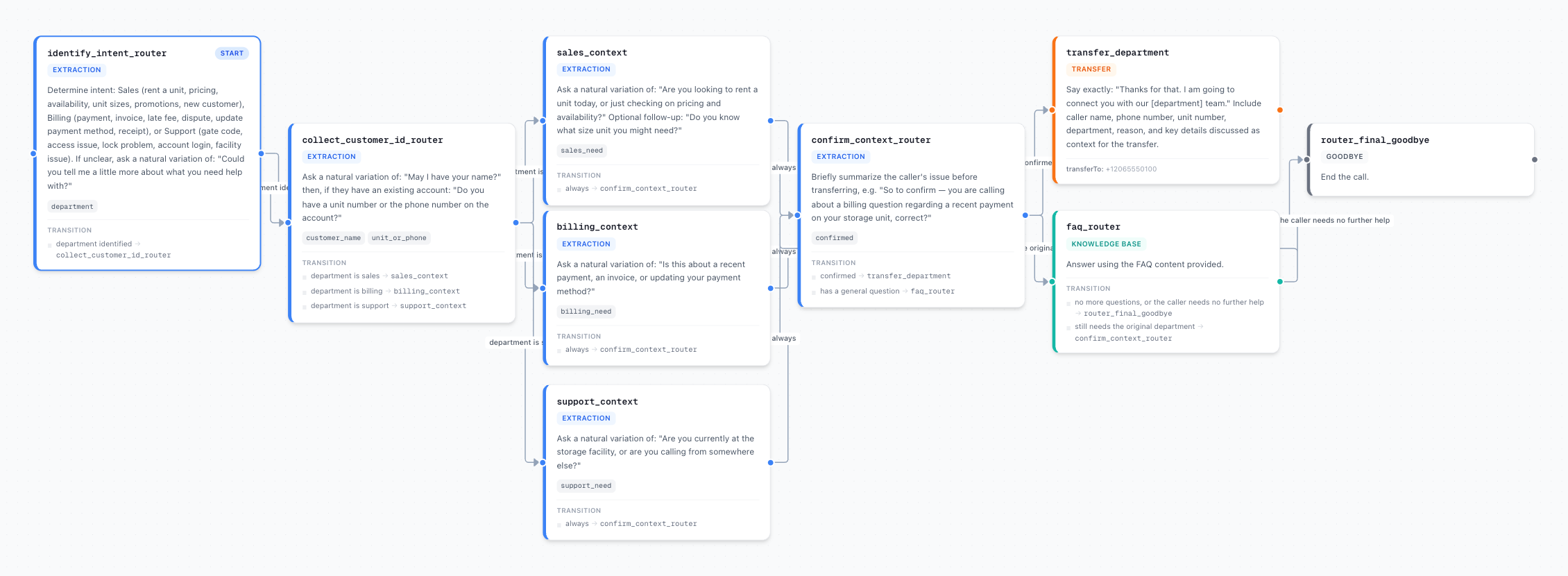
- Build
- Draw the conversation as a flow: steps, arrows and the condition for each. Reuse pieces across agents as subflows.
- Test
- Call yourself from the builder, or run simulated callers against a saved script before anyone real dials in.
- Deploy
- Publish a version, point a phone number at it, and roll back by restoring an earlier one. Live calls never change under you.
- Review
- Every call keeps its transcript, outcome and recording. Quality scores flag the calls worth listening to.
- Improve
- Compare two versions side by side, see what changed, and watch call volume and outcomes move.
Capabilities
Everything you need to automate your phone.
Turn on only what your business needs. Every capability below is a real, testable building block — not a marketing bullet point.
Natural turn-taking
Semantic turn detection instead of dead-air silence timers, with replies in about a second in our own call tests.
Calendar integration
Sync with Google, Outlook, and iCal via Cal.com. Availability is read live, not cached.
Knowledge base
Upload your FAQ or point it at your website. The agent answers from your material, not guesswork.
Independent blocks
Booking, transfer, and message-taking are separate toggles. Turn any of them on or off without a rebuild.
Call analytics
Call volume, booking rate, and the questions callers actually ask — with full transcripts.
Phone numbers
Take a dedicated number or forward the one you already publish. Works internationally.
Building blocks
Four blocks. Pick the ones you need.
Most phone AI ships as one opaque bundle you either accept or fight. This is assembled from parts you can switch on individually and hear working on their own.
Answer questions
Hours, location, pricing, parking, what you do and do not offer. Sourced from your own material so the answers stay accurate.
Book appointments
Reads live calendar availability, offers real slots, and writes the booking back — inside a single call.
Transfer the call
Route to the right person or team when the caller needs a human, with the context of what they already said.
Take a message
Capture name, number, and reason for calling, then deliver a clean summary rather than a raw voicemail.
Calling features
More than answering the phone.
The parts of a real call centre that agents usually fall short on, built in and testable one at a time.
Call transfer
Hand the caller to a person with a spoken line you write. We record how long the wait was and whether anyone picked up.
Agent-to-agent hand-off
Move a live call to another agent without hanging up. The conversation so far and the details collected carry over.
Outbound campaigns
Upload a list and dial it in a batch, paced to carrier limits so your numbers stay healthy.
Phone menus
Press keypad digits to work through another company’s phone menu, then carry on the conversation with a person.
Voicemail handling
Detect an answering machine on outbound calls, then hang up or leave the message you wrote.
Text during the call
Send the caller a confirmation text mid-call, from your number.
Secure card payments
Take a card payment on the keypad through Twilio, so card numbers are entered by the caller and never spoken aloud.
Post-call analysis
Define the fields you care about (was it booked, why not, how did the caller feel) and get them filled in for every call.
Business-hours routing
Route differently in and out of hours, in your own time zone, with daylight saving handled.
How it works
Live today, not next quarter.
Try a capability
Hear exactly one thing it does — FAQs, booking, transfer, or messages.
Pick your blocks
Choose the ones your business actually needs. Nothing else gets enabled.
Add your info
Business hours, services, and calendar. Takes a couple of minutes.
Go live
Get your phone number and start taking real calls the same day.
Developers
Everything in the app is also an API.
Create agents, publish versions, place calls and read transcripts from your own code, with keys you can revoke and scope to one workspace.
- Versioned REST API with an OpenAPI description and interactive docs.
- Signed webhooks when a call starts, completes, is analysed or is transferred.
- MCP server so an AI assistant in your editor can manage agents for you.
curl -X POST \
  https://calldesk.tech/api/v1/tenants/$TENANT/agents/from-template \
  -H "Authorization: Bearer $CALLDESK_API_KEY" \
  -H "Content-Type: application/json" \
-d '{"templateId": "medical-receptionist"}'claude mcp add calldesktech \
--env CALLDESK_API_KEY=cdk_live_... \
-- npx -y calldesktech-mcpSecurity and control
Built so a mistake can't reach your callers.
Your workspace, your data
Every request is checked against the workspace it belongs to. An API key works in exactly one workspace and cannot manage other keys.
Keys stored as hashes
API keys are shown once and stored only as a hash. Revoke one and it stops working immediately.
Verifiable webhooks
Each delivery is signed with a secret unique to your endpoint, so you can confirm it came from us.
Recording you control
Choose whether calls are recorded and how long recordings are kept. Expired recordings are removed automatically.
Protected numbers
Outbound calling is rate-limited per workspace and across the platform, which protects your numbers from being flagged.
FAQ
The questions people
ask before switching.
What happens if the AI cannot answer something?
It transfers to whoever you nominate, or takes a message with the caller’s name, number and reason for calling. It does not invent an answer to fill the gap.
Do I have to replace my current phone number?
No. You can forward the number you already publish, or take a new dedicated one. Forwarding means nothing on your printed material or listings has to change.
Can I hear it before I sign up?
Yes — the live demo runs the real agent, not a recording, and you can try one building block at a time to hear exactly what each one does.
Which calendars does booking work with?
Google Calendar, Outlook and iCal, connected through Cal.com. Availability is read at call time, so it never offers a slot that has already gone.
Can I build my own agent instead of using a template?
Yes. Start from a blank flow or from any template, edit the steps and conditions in the visual builder, test it with a call to yourself, then publish. Nothing goes live until you publish a version.
Is there an API?
Yes. Everything in the app is available through a versioned REST API with an OpenAPI description, signed webhooks, and an MCP server for AI assistants. Keys are created in Settings and scoped to one workspace.
What does it do outside business hours?
Whatever you configure. Common setups answer questions and take messages overnight, then resume booking and transfers when you open.
Can I turn a capability off later?
Yes. Booking, transfer and message-taking are independent toggles — switching one off does not affect the others and does not require any rebuild.
Hear it handle your first call in under a minute.
No install, no card, no sales call. Pick a template and listen to it run.